

Allocate More Memory to Services
The PerformanceGuard services—the Frontend Server, Backend Server, Web Server and Web Server 2 services—are allocated a certain amount of memory (by default a minimum of 2048 MB and a maximum of 4096 MB). If you experience performance problems, and you have sufficient memory available, you can allocate more memory to each of the services in Windows’ Registry Editor:
-
On the computer on which the required service is installed, click Start, type
regeditand press ENTER. -
Expand
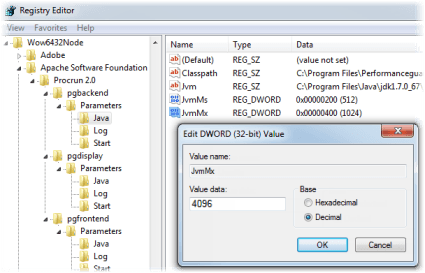
HKEY_LOCAL_MACHINE\SOFTWARE\WOW6432Node\Apache Software Foundation\Procrun 2.0, and then expand the key of the required service: pgbackend (Backend Server), pgdisplay (Web Server), pgdisplay2 (Web Server 2) or pgfrontend (Frontend Server). Then select Parameters → Java. -
The value JvmMs controls the minimum memory of the service in MB. JvmMx controls the maximum memory of the service in MB, so it’s typically this value that you want to modify.
Right-click the required value and select Modify…
-
Overwrite the number in the Value data field with the required number. Note that you can view the number in hexadecimal as well as decimal format.
-
Click OK. Repeat as required for the other services.
-
Restart the service to apply the new setting.