

Adaptive Baselining
Why should I use Adaptive Baselining?
There are several good reasons for using Adaptive Baselining. To comprehend the background better, the following sections describe some of the facts regards to the static and Adaptive Baselining:
Static Thresholds Shortcomings
Configuring thresholds for all business applications within your organization is a huge task. Every application must be analyzed individually to determine the performance level.
In this task lies also the comparison between location related differences in performance as the network latency caused by the physical distance to the server can have a severe impact on the performance experienced by the end-user.
Adaptive Baselining Benefits
How do you tackle the situation in above mentioned example? The answer is that you need a baseline that compares the actual value to the expected value. A baseline that is automatically determined by PerformanceGuard without user interaction.
For most systems, the performance of the system is closely related to the load from the end users – heavy load causes decreased performance resulting in longer response times. Fortunately, the load as well as the performance of a system can most often be predicted by analyzing data collected over time. This allows you to let PerformanceGuard determines if the current performance level is within the expected range and inform you if it is not.
How do we calculate Adaptive Baselining?
Section titled “How do we calculate Adaptive Baselining?”Adaptive Baselining is available in event rules of the types IP Service - Response Time, IP Service - Availability, Transaction - Response Time and Transaction - Availability. In the event rule, select Enable Adaptive Baselining and specify the Adaptive Baselining Margin in percent.
Adaptive Baselining Setup
PerformanceGuard analyzes data that it collects from the agents and compares the response times to the calculated value for that specific hour of the day and that specific day of the week. The values are continuously being updated to ensure that the calculation is based on the previous 4 weeks i.e. the current week will have similar pattern as the average of the previous 4 weeks, next week will have similar pattern of the current week and the previous 3 weeks and so on.
The calculated value is the average for the same hour on the same weekday in the previous 4 weeks. A margin is defined as a percentage above the calculated value for each application and if the response times for a computer is higher than this margin, an event will be triggered.
Resetting calculations
In the event that a change to your environment has caused a major change in the response time level, you have the option to reset the calculation of the Adaptive Baselining values. Add a date to the field Adaptive Baselining Reset Date in the event rule. The date can’t be in the future, and it can’t be more than one week back.
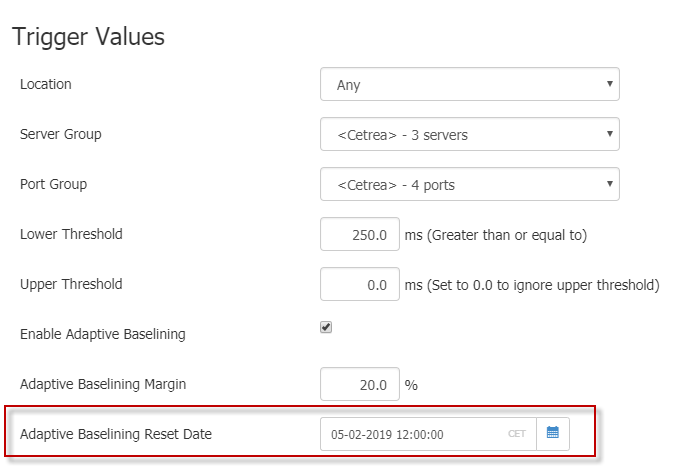
To view Adaptive Baselining on the Application Chart Widget, do the following:
For client/server applications
Section titled “For client/server applications”- Define the application. See Client Server Applications.
- Create an event rule for the application. See Manage Thresholds and Events.
- Set the Lower Threshold (only for IP Service - Response time) to 1.0 ms.
- Make sure that you have enabled Adaptive Baselining box.
- Set the Adaptive Baselining Margin to 10.0%.
View the Adaptive Baselining on your Widget.
For web applications
Section titled “For web applications”- Define the application. See Web Applications.
- Make sure that the agents in the relevant agent configuration groups measure the web application.
- Create an event rule for the application. See Manage Thresholds and Events.
- Set the Lower Threshold (only for Transaction - Response time) to 1.0 ms.
- Make sure that you have enabled Adaptive Baselining box.
- Set the Adaptive Baselining Margin to 10.0%.
View the Adaptive Baselining on your Widget.