

Agent Web Interface
The agent offers its own web (HTTP)-based interface. The interface allows users to retrieve measurements and other information from the agent, and it also lets users change agent configurations, queue application ping requests, etc.
Enable agent web server
Section titled “Enable agent web server”The agent web server can be configured either through the configuration distributed by PerformanceGuard or by adding registry values on individual computers that run the agent. See Agent Telnet and Web Servers.
Access agent web interface
Section titled “Access agent web interface”The agent web interface can be reached on the ‘/’ resource on the configured port, which will redirect you to the ‘/cmd/cmd’ resource, for example http://localhost:4007/.
By default you’ll see the View > Status page. See Status Report.
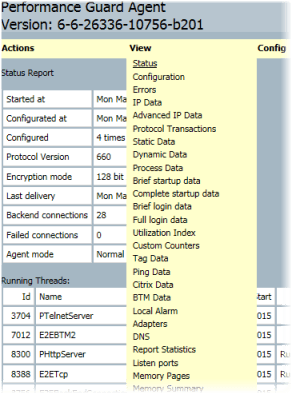
The agent web interface’s menu bar has two menus:
- Actions lets you, for example, send reports, reconfigure the agent, edit or reset the configuration, and queue application pings, traces and Citrix logins.
- View gives access to the configuration of the agent and to the data that the agent collects, for example Status, Configuration, Errors, IP Data, Adapters, DNS and Report Statistics.
Examples:
- Select View > IP Data to view IP-traffic data measured by the agent. This is the same as typing
view ipin the agent’s Telnet interface. - Select View > DNS to view all entries in the agent’s reverse DNS cache. This is the same as typing
view dnsin the agent’s Telnet interface.
Agent ‘Get’ interface
Section titled “Agent ‘Get’ interface”There is an additional web-based interface URL, which is normally used to relay information to the system tray icon. This interface is reached on, for example, http://localhost:4007/get/get?version=0.
One or more parameters may be queried in a single request:
| Parameter | Value |
|---|---|
| version | Build label |
| isservice | yes if the agent runs as a Windows service, otherwise no |
| build_time | Date and time of compilation |
| window_title | Window title to use for Agent |
| agent_name | Name of agent, distinguishes OEM agents |
| agent_dir | Folder where agent is installed |
| agent_id | ID assigned by PerformanceGuard backend server for the agent |
| configuration_id | ID of the configuration currently used by the agent |
| protocolversion | Version of the protocol used to communicate with the PerformanceGuard backend |
| GUImode | Configuration values that control how the agent should be presented |
| configuration | Agent configuration string |
The following command will query all variables:
http://localhost:4007/get/get?version=0&isservice=0&build_time=0&window_title=0&agent_name=0&agent_dir=0&agent_id=0&configuration_id=0&protocolversion=0&GUImode=0&configuration=0Example result (shortened):
version=<build label>isservice=yesbuild_time=<date and time>window_title= PerformanceGuard Agentagent_name=GuardAgentagent_dir=C:\Program Files\PerformanceGuard\Agentagent_id=5configuration_id=1protocolversion=830GUImode=Icon NoExit SendReportconfiguration="DiscoverServerPorts=trueTCPReport=trueUDPReport=trueProcessStatInterval=5DiskIOReport=trueGUIMode=Icon NoExit SendReportSocketReadTimeOut=6000TelnetClientList=127.0.0.1/8ReportInterval=60..."