AutoSteps Activity
The Activity page lists the AutoSteps activities that your scripts have reported to PerformanceGuard. Use it to find and delete activities that you no longer need, for example after you have renamed a transaction in a script.
Activities are shown as a tree with up to four levels, in the same structure that your scripts report them in:
- Transaction group
- Transaction name
- Tag
- Extra value
See Create a Script for how scripts report transaction groups, names and tags.
Find an activity
Section titled “Find an activity”- Select Administration → AutoSteps → Activity.
- Expand the tree, or type part of the name in the search field and select the activity in the list of suggestions.
Delete an activity
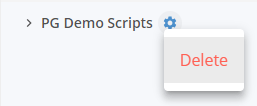
Section titled “Delete an activity”- Select the menu button next to the activity that you want to delete.
- Select Delete.
- If PerformanceGuard asks you to confirm, select Accept. PerformanceGuard always asks before it deletes a tag or an extra value, and before it deletes a transaction group or name that contains other activities. Everything under the activity is deleted too.
If a script reports the activity again later, it appears in the tree again.