My Computer Has an Agent

My computer has a PerformanceGuard agent installed. It’s a very small program that collects performance data about resource usage, response times, etc. from my computer.
As a computer user, I never see the agent or hear from it. It runs silently in the background. The important thing to note is that the agent doesn’t monitor me. It monitors how well my computer works for me.
At regular intervals the agent sends the collected performance data to a PerformanceGuard frontend server. The amounts of data that the agent sends are so small that they don’t affect the performance of my computer or the network.
My Frontend Server Listens and Stores Detailed Data
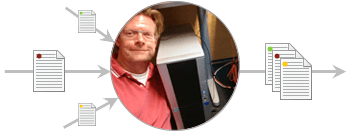
This is my PerformanceGuard frontend server. It’s located under my desk. It continuously listens for data from my agent, as well as from agents on 11 other computers that I look after. The frontend server never contacts the agents. It’s always the agents that contact the frontend server.
When my frontend server receives performance data from my agent, it stores the data in a database together with performance data from the other agents. Data from individual agents is labeled with individual IDs, so PerformanceGuard knows where each piece of data comes from.
The frontend server then sends a copy of the performance data to my PerformanceGuard backend server. Bigger PerformanceGuard systems than mine can have multiple frontend servers that each send performance data to the backend server.
My Backend Server Stores the Less Detailed Data
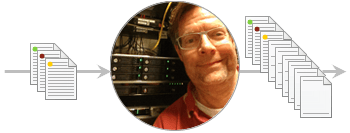
This is my PerformanceGuard backend server. It’s located in a server room. My backend server aggregates the data it receives from the frontend server.
Aggregation means that PerformanceGuard stores the data in different resolutions: My frontend server stores the very fine-grained data from individual agents. That’s the data resolution I use when I view detailed performance information about a specific computer. My backend server then stores the less detailed data resolutions for when I want to view trends or information about groups of computers. Read more in Aggregation of Data.
The detailed data about individual computers takes up far more space than the other data resolutions. That’s why my frontend server by default only keeps it for some days, but I can view the less detailed data from my backend server for a long time. If I want to view monthly trends, for example, I have data from more than a year.
I View Performance Information in the Web Interface

This is my PerformanceGuard web interface. I use it when I want to view performance data from my system. Here I’m comparing CPU usage on three of the computers that I look after.
When I use the web interface, it gets the information from my frontend and backend servers. Because PerformanceGuard stores data in several resolutions, I get the information fast. For example, if I want to view trend data from the last few days, PerformanceGuard doesn’t have to sort through all the detailed data first.
I’m the administrator of my own PerformanceGuard system, so I’ve got the full set of user rights, which means that I can also use the web interface to set up and manage my system.
Let's Recap ...

So, agents  send data to my frontend server. My frontend server
  stores the detailed data about individual computers.
My frontend server sends a copy of the data to my backend server  , which stores the data in less detailed resolutions.
I view data in the web interface  . When I view detailed data, the web interface gets it from my frontend server. Less detailed data comes from my backend server. Detailed data takes up a lot of space, so my frontend server only keeps it for a few days. My backend server keeps its less detailed data for much longer.
Got it? Then let’s look at three useful features that I’ve set up on my PerformanceGuard system …
I Use Reports to Keep People Informed

One of the things I’ve set up in the PerformanceGuard web interface is a report that my boss and I automatically get as a PDF in our mailboxes every Monday. The report outlines the past week’s performance of the computers that I’m responsible for.
We also get another report on a monthly basis. That one shows whether performance on my computers lives up to Key Performance Indicators, and whether our service levels have gone up or down in the past months. My boss likes that report, because he gets all the information he needs as an executive summary.
You have great flexibility when it comes to reports: Many PerformanceGuard customers especially like the fact that they can set up a report template, and then use it to automatically generate reports that contain the same type of information, but for different departments or geographical locations.
I Get Notified if Something Happens

Another thing I’ve set up in the PerformanceGuard web interface is e-mail notifications that I can read on my computer as well as on my smartphone.
Now I get notified instantly if something happens, for example if a process on one of the computers I look after uses too many resources or if one of our servers responds slowly.
Personally, I use the notifications reactively: When I get a notification, I fix the problem. However, many PerformanceGuard users use notifications proactively: They’ve set up notifications to get warned about potential problems, so they can look into them before they become real problems and begin to affect users.
Dashboards Show Me System Status

When I’m in my office, I often look up at a large monitor on the wall opposite my desk.
The monitor displays my PerformanceGuard dashboards. I’ve set up the dashboards to show the status of my team’s applications, servers and office locations (I have colleagues abroad). The dashboards give me excellent overviews of the entire team’s IT performance at a glance.
Even in my small-scale setup I find the dashboards useful, but they’re of course most often used by IT operations teams, helpdesks, support centers, etc.
This is how my PerformanceGuard system looks. What would yours look like?

