

Security Recommendations for AutoSteps
AutoSteps provides synthetic monitoring for application performance management by running executable and scripted recordings of transactions. Because AutoSteps runs as a logged-on user with automatic logon, limit access both to and from the computers with PerformanceGuard agents that run AutoSteps. Consider the following recommendations when you install AutoSteps.
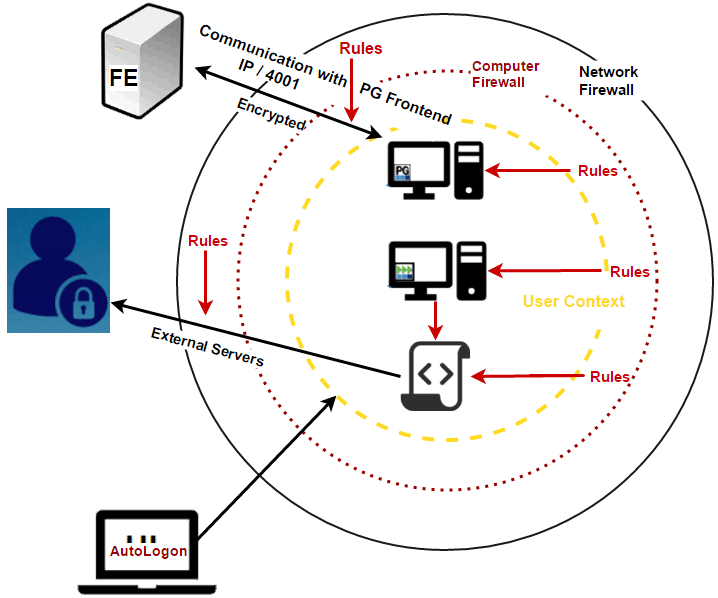
Physical vs. remote access
Section titled “Physical vs. remote access”AutoSteps runs as a user and not as a service. It only works, and keeps running, while the computer is logged on. That’s why the AutoSteps installer turns on Windows automatic logon for the account you specify, see Install AutoSteps.
Physical access
Section titled “Physical access”If the computers are physical rather than virtual, restrict access to them at the same level as production servers, for example by placing them in a locked server room. Configure automatic locking for the shortest practical time. A computer without a monitor and keyboard further limits physical access.
Remote access
Section titled “Remote access”Restrict remote desktop access from other computers as much as possible with:
- User login permissions
- Subnet or IP-based restrictions
Network-level restrictions
Section titled “Network-level restrictions”- Place the computers on a separate subnet behind a firewall to have the most granular control of the network traffic.
- Only allow access from the AutoSteps computers to the PerformanceGuard frontend server on port 4001 (or the port you have configured for agent connections).
- Set the agents’ authentication and encryption to the strictest level for connections to the PerformanceGuard frontend server, to avoid rogue servers.
- Minimize traffic between the AutoSteps subnet and the production and server subnets as much as possible.
Computer-level restrictions
Section titled “Computer-level restrictions”Set up dedicated firewall rules on the computers, as well as rules for the processes that AutoSteps runs. You can combine these with other rules for more granular network access.
- Only allow access from the AutoSteps computers to the PerformanceGuard frontend server on port 4001.
- Only allow access to external servers from the processes that run the scripts.
- Consider rules in the local Windows firewall that only allow the processes run by
AutoSteps.exe.
User-level restrictions
Section titled “User-level restrictions”- Use a dedicated user account for AutoSteps.
- Give this account the minimum network permissions it needs.
Custom key encryption
Section titled “Custom key encryption”The AES key ensures secure communication between the PerformanceGuard agent and the frontend server.
- Create a secret encryption key.
- Enable the key both for the AutoSteps agents and for the frontend server during installation.
- Configure the agents to use Strong encryption.