

Security Score Calculation
Security score ratings
Section titled “Security score ratings”Security scores are automatically calculated and presented with a name and color.
Good indicates that everything is fine and further attention is not needed
Fair indicates that something might be wrong and attention is advised
Poor indicates that something is wrong and action is required
None indicates that necessary information cannot be collected *
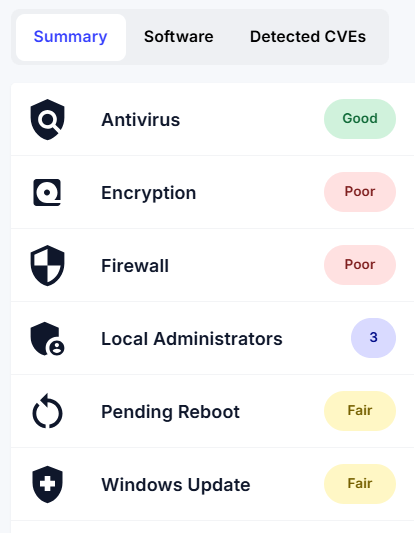
How security scores are calculated
Section titled “How security scores are calculated”Antivirus
Section titled “Antivirus”If the antivirus engine is not running, the security score is Poor
If the antivirus engine is running, but the virus definition updates are not up to date, the security score is Fair
If the antivirus engine is running, and the virus definition updates are up to date, the security score is Good
If the necessary information cannot be collected, the security score is None
Drivers
Section titled “Drivers”If the hardware model is supported and the drivers are up to date, the security score is Updated
If the hardware model is supported and the drivers are not up to date, the security score is Outdated
If the hardware model is not supported or necessary information is missing, the security score is None *
Drivers are matched against the repository with driver packs provided by CapaOne Drivers and are only shown on the Security Overview tab
Encryption
Section titled “Encryption”If the boot drive is not encrypted, the security score is Poor
If the boot drive is encrypted, and no data drives exist, the security score is Good
If the boot drive is encrypted, but one or more data drives are not encrypted, the security score is Fair
If the boot drive is encrypted, and all data drives are encrypted, the security score is Good
If the necessary information cannot be collected, the security score is None
Drive lock status does not affect the security score
Firewall
Section titled “Firewall”If a network connection is connected, and the software firewall is not active, the security score is Poor
If a network connection is connected, and the software firewall is active, the security score is Good
If the necessary information cannot be collected, the security score is None
Local Administrators
Section titled “Local Administrators”Local administrators don’t get a Good, Fair, Poor, or None score.
Instead, the number of local administrators on each endpoint is shown. On the Overview tab, the Local Administrators widget also shows whether each endpoint is Compliant or Non-compliant:
- Compliant means that every local administrator on the endpoint is on your approved list. Endpoints with no local administrators are compliant.
- Non-compliant means that the endpoint has at least one local administrator that isn’t approved.
The Local Administrators widget isn’t part of the Average Security Score. To build the approved list, see Approve Local Administrators.
Pending Reboot
Section titled “Pending Reboot”If no reboots are pending, the security score is Good
If a reboot is pending, the security score depends on the reboot severity.
- Blocks other installations = Fair
- Security patches awaits activation = Poor
- Computer has been renamed = Poor
- The computer awaits domain join = Poor
If the necessary information cannot be collected, the security score is None
Software
Section titled “Software”If an installed application is supported and up to date, the security score is Updated
If an installed application is supported but not up to date, the security score is Outdated
If the necessary information cannot be collected, the security score is None
Software is matched against the repository with applications provided by CapaOne Updater and is only shown on the Security Overview tab
Windows Update
Section titled “Windows Update”If an update is installed, the security score is Good
If an update is not installed, and the update is optional, the security score is Good
If an update is not installed, and a CVE article is linked to the update, the security score is Poor
If an update is not installed, and the update is not optional, and a CVE article is not linked, the security score depends on the MSRC Severity Rating
- Critical or Important = Poor
- Moderate, Low or None = Fair
If the necessary information cannot be collected, the security score is None
Recommendations
Section titled “Recommendations”In general, higher security scores indicate a more secure system. A security score of Good indicates that the system is well-protected, while a security score of Poor indicates that the system is more vulnerable to attacks.
Here are some recommendations to improve security scores:
- Keep the antivirus software up to date
- Encrypt all hard drives
- Enable the software firewall
- Limit the number of local administrators
- Reboot regularly
- Install available Windows updates
Following these recommendations improves security scores and makes the system less vulnerable to attacks.