This reference lists every configuration type available under Apple → Configurations → DDM →
New, on the Configurations tab. For asset types (the Assets tab in the same picker), see
DDM Assets.
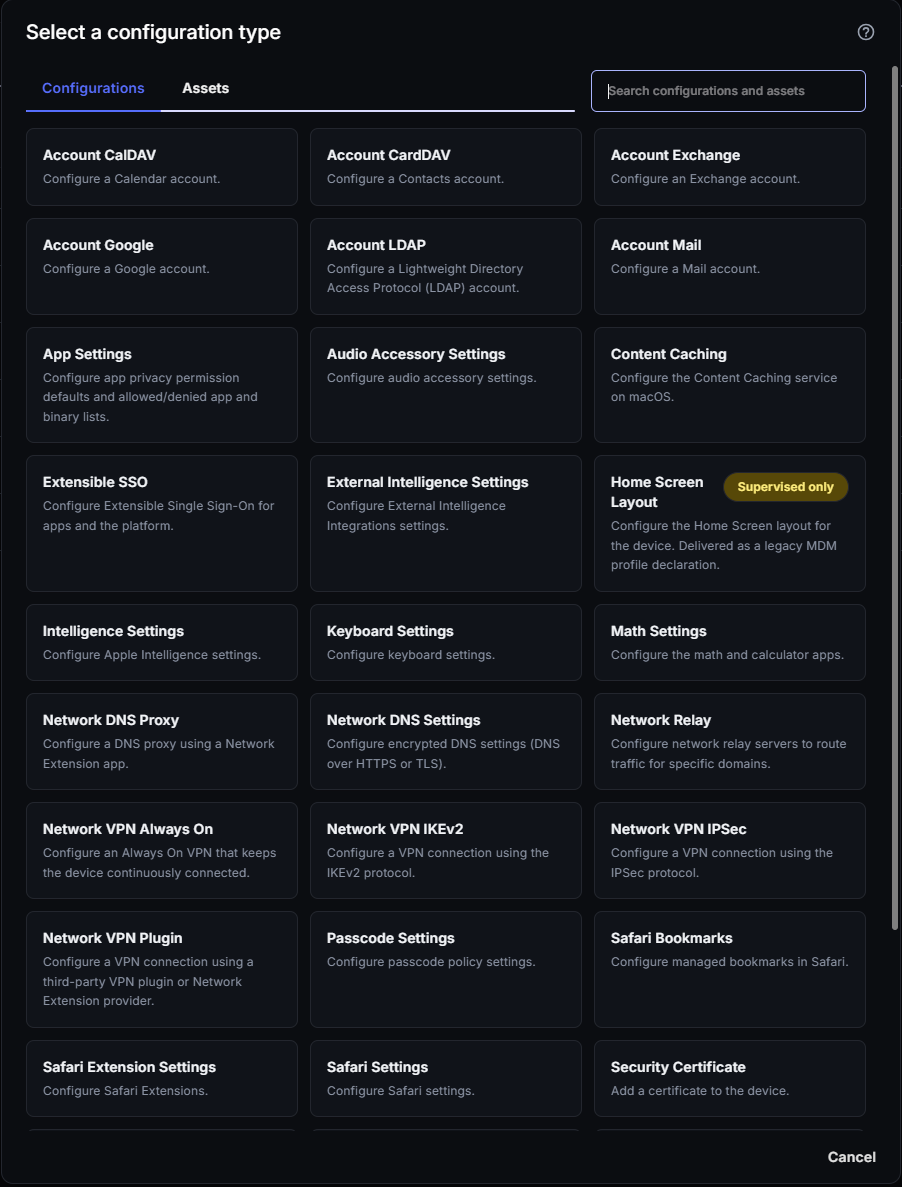
The picker itself lists every type alphabetically, in a single grid — the categories below are
groupings for this reference, not a distinction CapaOne’s UI makes. The picker shows a
Supervised only label on Home Screen Layout. Supervised only means the configuration has no
effect on Unsupervised (BYOD) devices; see Endpoint Management
Modes for the Supervised/Unsupervised split.
- Minimum iOS — the oldest iOS or iPadOS version that supports the declaration. A device on an
older version rejects the configuration. See DDM — Unknown Configuration Error or Cannot Be
Applied.
- Unsupervised — whether the declaration works on devices enrolled without supervision
(device enrollment). No means it only works on supervised devices, even when the picker
doesn’t show a Supervised only label.
- Notes — what the type is for, and known limitations.
The minimum versions and limitations come from Apple’s
device management schema,
checked in September 2026.
| Configuration type |
Minimum iOS |
Unsupervised |
Notes |
| Account CalDAV |
15.0 |
Yes |
Configure a Calendar account. |
| Account CardDAV |
15.0 |
Yes |
Configure a Contacts account. |
| Account Exchange |
15.0 |
Yes |
Configure an Exchange account. |
| Account Google |
15.0 |
Yes |
Configure a Google account. |
| Account LDAP |
15.0 |
Yes |
Configure a Lightweight Directory Access Protocol (LDAP) account. |
| Account Mail |
15.0 |
Yes |
Configure a Mail account. |
| Configuration type |
Minimum iOS |
Unsupervised |
Notes |
| Network DNS Proxy |
27.0 |
Yes |
Configure a DNS proxy using a Network Extension app. Replaces the Legacy DNS Proxy payload, which Apple deprecated in iOS 27. |
| Network DNS Settings |
27.0 |
Yes |
Configure encrypted DNS settings (DNS over HTTPS or TLS). Replaces the Legacy DNS Settings payload, which Apple deprecated in iOS 27. On unsupervised devices, the settings only apply to managed networks. On supervised devices, they apply to all networks. |
| Network Relay |
27.0 |
Yes |
Configure network relay servers to route traffic for specific domains. Replaces the Legacy Relay payload, which Apple deprecated in iOS 27. |
| Network VPN Always On |
27.0 |
Yes |
Configure an Always On VPN that keeps the device continuously connected. |
| Network VPN IKEv2 |
27.0 |
Yes |
Configure a VPN connection using the IKEv2 protocol. |
| Network VPN IPSec |
27.0 |
Yes |
Configure a VPN connection using the IPSec protocol. |
| Network VPN Plugin |
27.0 |
Yes |
Configure a VPN connection using a third-party VPN plugin or Network Extension provider. |
| Configuration type |
Minimum iOS |
Unsupervised |
Notes |
| Security Certificate |
17.0 |
Yes |
Add a certificate to the device. Can be paired with an asset — see DDM Assets. |
| Security Identity |
17.0 |
Yes |
Install an identity on the device. |
| Passcode Settings |
15.0 |
Yes |
Configure passcode policy settings. Replaces the Legacy Passcode payload, which Apple deprecated in iOS 27. Assigning it makes the device ask the user to set a passcode. |
| Extensible SSO |
27.0 |
Yes |
Configure Extensible Single Sign-On for apps and the platform. |
| Configuration type |
Minimum iOS |
Unsupervised |
Notes |
| Software Update Settings |
18.0 |
Yes |
Configure software updates. Required on iOS 27 in place of Legacy MDM software update management — see iOS 27 and Software Update Management. Deferrals, automatic downloads and installs, Background Security Improvements, and beta enrollment only work on supervised devices. |
| Software Update Enforcement Specific |
17.0 |
Yes |
A software update enforcement policy for a specific OS release. If the target version isn’t an available update, the configuration stays active but the device doesn’t update. A supplemental update, such as 16.1 (a), only installs on a device that already runs the base version. |
| Configuration type |
Minimum iOS |
Unsupervised |
Notes |
| External Intelligence Settings |
26.4 |
No |
Configure External Intelligence Integrations settings. Controls third-party AI integrations in Apple Intelligence, such as ChatGPT. Maps to Apple’s com.apple.configuration.external-intelligence.settings. |
| Intelligence Settings |
26.4 |
No |
Configure Apple Intelligence settings: Apple Intelligence, summarization, Writing Tools, Image Playground, Genmoji, and the ChatGPT integration. |
| Siri Settings |
26.4 |
No |
Configure Siri settings: whether Siri is on, Siri while locked, user-generated content, and the profanity filter. |
| Configuration type |
Minimum iOS |
Unsupervised |
Notes |
| App Settings |
27.0 |
No |
Configure app privacy permission defaults and allowed/denied app and binary lists. See App Settings limitations. |
| Content Caching |
Not supported on iOS |
— |
Configure the Content Caching service on macOS. Requires macOS 27.0. |
| Safari Bookmarks |
26.0 |
Yes |
Configure managed bookmarks in Safari. |
| Safari Extension Settings |
18.0 |
No |
Configure Safari Extensions. If a domain is in both the allowed and denied lists, Safari denies it. |
| Safari Settings |
26.0 |
Yes |
Configure Safari settings. Most settings require a supervised device. On unsupervised devices, only the new-tab start page applies. Website privacy permission defaults, such as camera and microphone, only apply after the user accepts a consent prompt. |
| Web Content Filter Plugin |
27.0 |
Yes |
Configure web content filtering using a third-party Network Extension plugin. |
- Privacy permissions are defaults, not grants. When the app starts, the device shows a consent
prompt. The defaults only apply if the user selects Allow. If the user selects Not Now,
the app asks for each permission in the normal way. The user can change the permissions later in
Settings.
- The prompt only covers permissions the user hasn’t seen. If the user has already seen all the
configured permissions for the app, the prompt doesn’t appear.
- Permissions available on iOS: Location (
WhileUsing or Always), Location accuracy,
Bluetooth, Camera, Dictation, Local network, and Microphone.
- macOS-only settings: the Accessibility permission, the allowed and denied binaries lists, and
Always allow managed apps don’t apply on iOS.
- Several App Settings configurations are combined. If more than one allowed apps list applies
to a device, only apps that are in every list stay allowed. Apps in any denied apps list stay
denied.
- Denying system apps can disable other features. For example, denying the App Store can stop
users from accepting the terms for user-based Volume Purchase Program (VPP) apps.
| Configuration type |
Minimum iOS |
Unsupervised |
Notes |
| Audio Accessory Settings |
26.0 |
No |
Configure audio accessory settings. Turning off temporary pairing doesn’t stop users from pairing their own audio accessories. |
| Keyboard Settings |
26.4 |
No |
Configure keyboard settings: auto-correct, auto-capitalization, dictation, math keyboard suggestions, predictive text, slide to type, spell checking, and text replacement. |
| Math Settings |
18.0 |
No |
Configure the math and calculator apps. |
| Configuration type |
Minimum iOS |
Unsupervised |
Notes |
| Home Screen Layout |
15.0 |
No |
Supervised only. Configure the Home Screen layout for the device — delivered as a legacy MDM profile declaration under the hood, a bridging mechanism for configurations without a native DDM equivalent yet. |
- This list reflects the picker as of today — Apple and CapaOne both add configuration types
over time. If a type you expect isn’t listed here, check the live picker at Apple →
Configurations → DDM → New.
- Meeting the minimum iOS version doesn’t guarantee a configuration applies — if a supported
device still rejects a configuration, see DDM — Unknown Configuration Error or Cannot Be
Applied.
- Not every configuration needs an asset — most types in this list are self-contained. Only
reach for DDM Assets when a configuration needs
to reference a credential, identity, or stored data.

