

Apple VPP License Tracking
Apps purchased through Apple’s Volume Purchase Program (VPP) via Apple Business Manager require a license for each device or user they are assigned to. CapaOne tracks these licenses automatically and displays the current allocation under Apple → VPP Licenses.
How VPP licenses work
Section titled “How VPP licenses work”When you purchase app licenses in Apple Business Manager, they sync to CapaOne automatically. You do not add licenses manually in CapaOne — the counts update after each sync with Apple.
When you assign a VPP app to a group or endpoint in Apple → Applications, CapaOne automatically allocates a license from the available pool. When a device is removed from an assignment, the license is returned to the available pool and can be reused.
The license isn’t returned right away. It usually takes about 10 minutes, and can take longer. The device must be online and check in before CapaOne can release its license. A device that’s offline keeps its license until it checks in again.
Reading the license list
Section titled “Reading the license list”Each row shows:
- Name — the app name and its bundle ID (the unique Apple identifier, e.g.,
com.adobe.Adobe-Reader) - Available — licenses that are purchased but not yet assigned to any device
- Assigned / Total — how many of the total purchased licenses are currently in use
For example, 9 / 1000 means 1000 licenses were purchased and 9 are currently assigned, leaving
991 available.
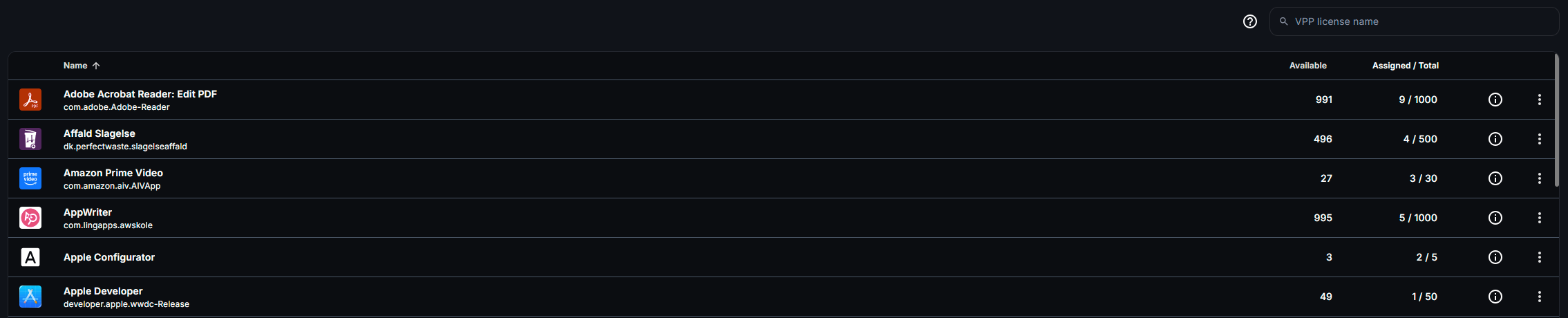
Click an app’s name to open VPP Assignments, which lists the devices that use a license for the app, with their name and serial number.
To fetch the latest license counts from Apple Business Manager right away, select the sync icon (Sync VPP) above the list.
When licenses run out
Section titled “When licenses run out”If Available reaches 0, CapaOne cannot assign the app to additional devices. Attempts to expand the assignment will fail until more licenses are purchased.
To get more licenses, purchase them in Apple Business Manager. They will appear in CapaOne after the next sync.
Good to know
Section titled “Good to know”- License reclamation is automatic — when a device unenrolls or an app assignment is removed, the license is freed without any manual action, once the device checks in.
- Purchased but unassigned licenses are visible in the list with an Assigned count of 0 — they are ready to use but have not yet been deployed.
- Bundle IDs are useful for troubleshooting app conflicts or identifying apps when display names are ambiguous.
- VPP licenses are per-organization — if you manage multiple organizations in CapaOne, each has its own VPP token and license pool.