

Apple DDM
Apple Declarative Device Management (DDM) is Apple’s modern device management protocol. Instead of CapaOne sending a command and waiting for the device to respond, the device evaluates a set of declarations locally and reports status changes back on its own.
Apple is phasing out the traditional command-and-response MDM protocol in favor of DDM, starting with devices running iOS 17 and later.
Why DDM matters
Section titled “Why DDM matters”- Faster, more reliable configuration — declarations apply and reconcile on the device itself, without waiting on a round trip to the server.
- Software update management moves to DDM on iOS 27 — as of iOS 27, Legacy MDM’s software update commands, software update queries, recommended cadence settings, and restrictions like deferrals and Background Security Improvements (BSI) no longer function. These commands don’t error — they silently stop applying. Move software update policy to DDM’s Software Update Settings and Software Update Enforcement Specific configuration types before deploying iOS 27 to your fleet. See iOS 27 and Software Update Management.
- Runs alongside Legacy MDM during the transition — CapaOne supports both protocols, so you can migrate devices at your own pace instead of all at once.
- iOS 27 devices move to DDM automatically — CapaOne automatically switches a device from Legacy MDM to DDM once it reports iOS, iPadOS, or macOS 27 or later, whether it’s already on version 27 today or updates to it later. You don’t need to request Enable Apple DDM for these devices — but this also means any DDM configuration you rely on (especially software update policy) must be in place before the device updates, not after.
DDM in CapaOne
Section titled “DDM in CapaOne”CapaOne’s DDM tab supports both Supervised and Unsupervised (BYOD) Apple devices running iOS or iPadOS 17 or later, or macOS 14 or later — the same management-mode split as Legacy MDM. DDM is only partially available on Unsupervised devices: which declarations apply depends on the device’s iOS version and the specific declaration, not on management mode alone. See Apple’s declarative configurations guide for the full breakdown of which declarations need Supervised mode.
Configurations built for DDM live under their own DDM tab in Apple → Configurations, separate from your existing Legacy configurations — so nothing changes for devices you haven’t migrated yet.
Available configuration types
Section titled “Available configuration types”Clicking New under Apple → Configurations → DDM opens the Select a configuration type picker, listing every available type as a flat, alphabetically sorted grid — CapaOne doesn’t group them by category in the picker itself. The table below groups them by category for reference, so you can check whether a configuration type exists without opening the picker. For setup details on any individual type, see DDM Configuration Types Reference.
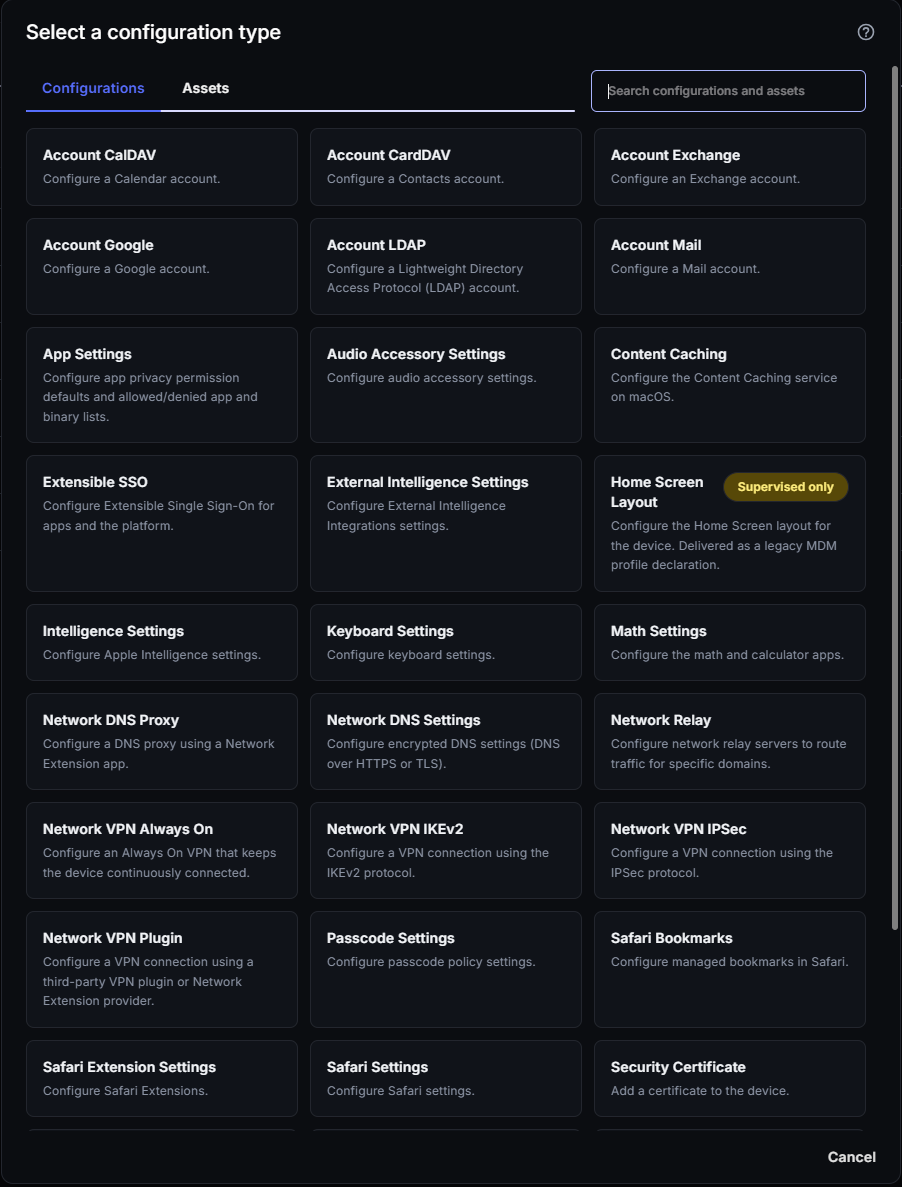
| Category | Configuration types |
|---|---|
| Account | Account CalDAV, Account CardDAV, Account Exchange, Account Google, Account LDAP, Account Mail |
| Network | Network DNS Proxy, Network DNS Settings, Network Relay, Network VPN Always On, Network VPN IKEv2, Network VPN IPSec, Network VPN Plugin |
| Security | Security Certificate, Security Identity, Passcode Settings, Extensible SSO |
| Software Update | Software Update Settings, Software Update Enforcement Specific |
| Intelligence & AI | External Intelligence Settings, Intelligence Settings, Siri Settings |
| Apps & content | App Settings, Content Caching, Safari Bookmarks, Safari Extension Settings, Safari Settings, Web Content Filter Plugin |
| Device & input | Audio Accessory Settings, Keyboard Settings, Math Settings |
| Legacy bridge (Supervised only) | Home Screen Layout |
The Network types, Extensible SSO, App Settings, Content Caching, and Web Content Filter Plugin require iOS, iPadOS, or macOS 27 or later. See the minimum versions in the DDM Configuration Types Reference.
External Intelligence Settings controls third-party AI integrations in Apple Intelligence, such as ChatGPT. To restrict Siri, use Siri Settings. To restrict Apple Intelligence features, use Intelligence Settings. See Apple Intelligence, Siri and External AI Controls for every setting, and Apple’s iOS 27 enterprise release notes for the platform-level behavior.
Assets: a second category alongside configurations
Section titled “Assets: a second category alongside configurations”Apple → Configurations → DDM → New has two tabs: Configurations and Assets. An asset isn’t a configuration by itself — it’s a reference to a credential, identity, or piece of data that a configuration can point to. For example, a Security Identity configuration references an Asset Credential Identity or Asset Credential SCEP asset instead of embedding certificate material directly.
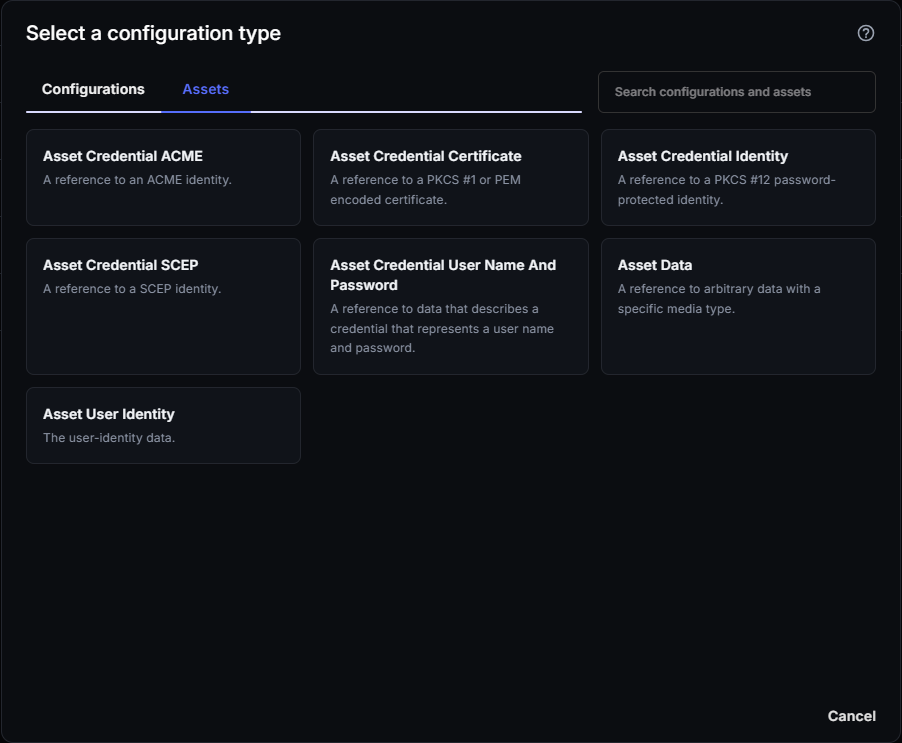
The Assets tab includes:
- Asset Credential ACME — a reference to an ACME identity.
- Asset Credential Certificate — a reference to a PKCS #1 or PEM encoded certificate.
- Asset Credential Identity — a reference to a PKCS #12 password-protected identity.
- Asset Credential SCEP — a reference to a SCEP identity. See SCEP in CapaOne for background on how SCEP issues certificates.
- Asset Credential User Name And Password — a reference to data that describes a credential representing a username and password.
- Asset Data — a reference to arbitrary data with a specific media type.
- Asset User Identity — the user-identity data.
See DDM Assets for what each asset type is for and how to reference one from a configuration.
In this section
Section titled “In this section”- How DDM Works — declarations, assets, status reporting, and how they map to CapaOne.
- Enable Apple DDM — migrate Apple devices from Legacy MDM to DDM, step by step.
- Legacy MDM to DDM Mapping — every Legacy setting Apple deprecated or removed, and its DDM replacement.
- iOS 27 and Software Update Management — what breaks on Legacy MDM in iOS 27.
- Software Update Settings — every setting, with recommended baselines.
- Enforce a Specific OS Update — install a version by a deadline, in rings.
- DDM Passcode Settings — passcode policy in DDM, and moving off the deprecated Legacy payload.
- Configure Accounts with DDM — Exchange, Mail, CalDAV, CardDAV, LDAP and Google accounts.
- Apple Intelligence, Siri and External AI Controls — restrict AI features and third-party AI.
- How Multiple DDM Configurations Combine — what happens when configurations overlap.
- DDM Assets — credential, identity, and data assets that configurations can reference.
- DDM Configuration Types Reference — every type, its minimum version, and known limitations.
- Apple DDM FAQ — quick answers to common questions.
Good to know
Section titled “Good to know”- DDM and Legacy MDM can coexist — a device runs under one protocol at a time, but your organization can have devices on both while you migrate.
- Not every configuration needs to move immediately — Legacy configurations that Apple hasn’t deprecated keep working. Prioritize recreating configurations that are deprecated or unsupported under DDM. See Legacy MDM to DDM Mapping for the list.
- Legacy configurations can be delivered as declarative assets — Apple can bridge a Legacy MDM profile into DDM by delivering it as a declarative asset, without a native DDM equivalent existing yet. Home Screen Layout is a live example in CapaOne: it’s labeled Supervised only and is delivered as a legacy MDM profile declaration under the hood.
- Set up Apple MDM first — DDM builds on the same push certificate, Apple Business Manager (DEP), and enrollment already configured for Apple MDM. See that section if you haven’t enrolled Apple devices in CapaOne yet.
- Seeing an unexpected error on a DDM configuration? See DDM — Unknown Configuration Error or Cannot Be Applied, DDM Status Reason Codes, or DDM Software Update Not Installing.