

Configuration Priority
Priority determines which configuration applies when a device is assigned more than one configuration at the same time. This works the same way across Windows, Android, and Apple.
How priority works
Section titled “How priority works”Every configuration has a priority value where 1 is the highest priority — lower numbers take precedence over higher ones. Think of it like a ranking: 1st place beats 2nd place.
Priority only comes into play when the same device is covered by multiple configurations — for example, because it belongs to two groups that each have a different configuration assigned, or because it has both a direct assignment and a group assignment.
When that happens, the configuration with the lowest priority number wins. For Android and Apple, a direct assignment always ranks above a group assignment. See Android and Apple: direct assignments and settings.
If a device is only assigned one configuration, priority is irrelevant — that configuration always applies.
Android and Apple: direct assignments and settings
Section titled “Android and Apple: direct assignments and settings”For Android and Apple devices, CapaOne combines all the configurations a device gets into one set of settings:
- Direct assignments come first. Configurations assigned directly to the device rank above configurations the device gets through groups, whatever their priority numbers. Within each of the two, the lowest priority number comes first.
- Conflicts are resolved per setting. If two configurations contain the same setting, the device gets the setting from the configuration that ranks highest. The other settings from the lower-ranked configuration still apply.
For example, a device gets a Wi-Fi configuration directly and a restrictions configuration with priority 1 through a group. It gets both, because they don’t contain the same settings. If both contained Wi-Fi settings, the device would use the Wi-Fi settings from the direct assignment.
Practical example
Section titled “Practical example”A device is a member of two groups: All Devices and Developers.
- The All Devices group has a Standard Privileges configuration assigned (priority 20).
- The Developers group has a Developer Privileges configuration assigned (priority 2).
Because the device is in both groups, it receives both configurations. Priority resolves the conflict: the Developer Privileges configuration (priority 2) wins because it has the lower number.
A device that is only in the All Devices group receives only the Standard configuration — there is no conflict, so priority does not matter for that device.
Reordering priorities
Section titled “Reordering priorities”In Windows, Android, and Apple Configurations, the Change priority for configurations button opens a view where you can drag and reorder all configurations at once, rather than editing each one individually. Use this when restructuring your priority scheme.
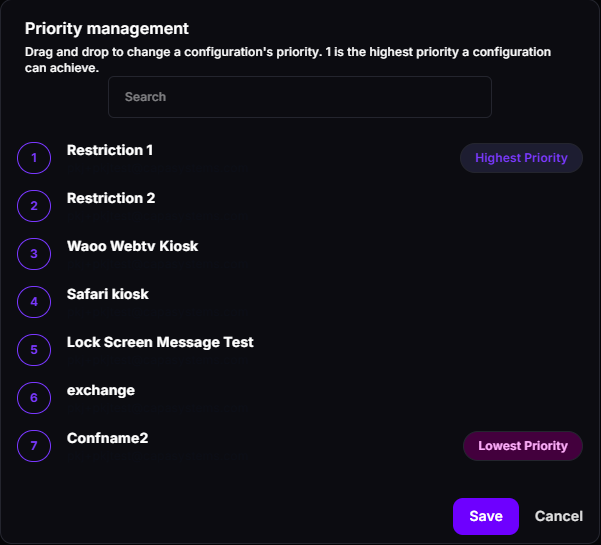
A new configuration gets the lowest priority. In Windows, priority is ranked separately for each configuration type, so Privileges and DriverInstaller configurations each have their own order, and a new configuration gets the lowest priority of its type. See Windows Configurations.
Good to know
Section titled “Good to know”- Lower number = higher priority — priority 1 always wins over priority 10. Think of it as a ranking where 1st place is the winner.
- Priority is per-platform — Windows configuration priorities are separate from Android and Apple priorities.
- Unassigned configurations have no effect — a configuration with any priority value only matters if it is assigned to at least one endpoint or group.
- Check effective configuration — if a device is not behaving as expected, open its detail page and review which configurations are currently applied and their priority values.